3D Printer: Difference between revisions
m (→Filament) |
|||
| (13 intermediate revisions by the same user not shown) | |||
| Line 2: | Line 2: | ||
SuperSlicer / PrusaSlicer |
SuperSlicer / PrusaSlicer |
||
Also tick 'Only custom Start G-Code' |
Also tick 'Only custom Start G-Code' |
||
START_PRINT BED_TEMP=[first_layer_bed_temperature] EXTRUDER_TEMP={first_layer_temperature[initial_extruder]} |
START_PRINT BED_TEMP=[first_layer_bed_temperature] EXTRUDER_TEMP={first_layer_temperature[initial_extruder]} MATERIAL='{filament_type[initial_extruder]}' |
||
Cura: |
Cura: |
||
START_PRINT BED_TEMP={material_bed_temperature_layer_0} EXTRUDER_TEMP={material_print_temperature_layer_0} |
START_PRINT BED_TEMP={material_bed_temperature_layer_0} EXTRUDER_TEMP={material_print_temperature_layer_0} MATERIAL='{material_type}' |
||
* Start/End GCODE |
* Start/End GCODE |
||
* Retraction distance = 0.5mm (TODO: Tower) |
* Retraction distance = 0.5mm (TODO: Tower) |
||
| Line 28: | Line 28: | ||
!Filament |
!Filament |
||
!Nozzle |
!Nozzle |
||
!Temp |
!Hotend Temp |
||
!Bed Temp |
|||
| ⚫ | |||
!Fan |
|||
!Retraction |
!Retraction |
||
| ⚫ | |||
| ⚫ | |||
|2023-04-04 |
|||
|Temperature Tower #3 |
|||
|3D Fillies Black ABS |
|||
| ⚫ | |||
|🧪'''270°C-230°C''' |
|||
|100°C |
|||
|'''%40''' |
|||
|0.4mm @ 12mm/s |
|||
|Not as nice overhangs as %50 but not much stringing and the print finished. Best temps are at 255°C and 265°C |
|||
| ⚫ | |||
|2023-04-04 |
|||
|Temperature Tower #2 |
|||
|3D Fillies Black ABS |
|||
|0.4mm CVT |
|||
|🧪'''270°C-230°C''' |
|||
|100°C |
|||
|'''%30''' |
|||
|0.4mm @ 12mm/s |
|||
|No stringing but lots of overhang issues. 255°C is the only one that didn't have drooping on the bridges. Stayed on the bed. |
|||
| ⚫ | |||
|2023-04-04 |
|||
|Temperature Tower |
|||
|3D Fillies Black ABS |
|||
|0.4mm CVT |
|||
|🧪'''260°C-235°C''' |
|||
|'''100°C''' |
|||
|'''%50''' |
|||
|0.4mm @ 12mm/s |
|||
|Seemed fine across a lot of the temperature ranges. Some stringing at higher temps, worst at 260°C, less at 255°C but some most of the way up. Might be fan related? Or maybe retraction. Came of the bed near the top though... Could also be fan related if it was caused by warping catching the hotend. 250°C seemed best, but 245°C almost the same. Actually 260°C was probably even better if it wasn't for the stringing. |
|||
| ⚫ | |||
|2023-03-31 |
|||
|Regular Print (clip) |
|||
|3D Fillies ABS Black |
|||
|0.4mm CVT |
|||
|245°C |
|||
|🧪 |
|||
| ⚫ | |||
|'''0.4mm @ 12mm/s''' |
|||
|90°C on the bed didn't give good layer adhesion although it seemed to be fine for the White ABS. Tried lower zoffsets without success (4 failed prints and reducing zoffsets). 110°C works fine at original offset for 6 prints (although I also moved the location of the print towards the front). Slight warping near bottom. 100°C seemed to work ok aswell (only 1 print). |
|||
|- |
|- |
||
|2023-03-14 |
|2023-03-14 |
||
| Line 37: | Line 79: | ||
|0.4mm CVT |
|0.4mm CVT |
||
|245°C |
|245°C |
||
|90°C |
|||
| ⚫ | |||
| |
| |
||
|🧪 |
|||
| ⚫ | |||
|- |
|- |
||
|2023-03-14 |
|2023-03-14 |
||
| Line 44: | Line 88: | ||
|eSun ABS+ While |
|eSun ABS+ While |
||
|0.4mm CVT |
|0.4mm CVT |
||
| |
|🧪250°C-230°C |
||
|90°C |
|||
| ⚫ | |||
|'''0.4mm, 5mms''' |
|||
|245°C seems best, least droop. Got slight warping near the top with 30% fan speed. Used Cura with stock speed settings. |
|245°C seems best, least droop. Got slight warping near the top with 30% fan speed. Used Cura with stock speed settings. |
||
|} |
|||
| ⚫ | |||
== Filament Settings == |
|||
{| class="wikitable" |
|||
|+ |
|||
!Type |
|||
!Brand |
|||
!Color |
|||
!Hotend |
|||
!Bed |
|||
!Retraction |
|||
!Notes |
|||
|- |
|- |
||
|ABS+ |
|||
|eSun |
|||
|White |
|||
|245°C |
|||
|90°C |
|||
|0.4mm @ 12mm/s |
|||
|Seems brittle. Maybe try hotter temps with a higher fan? |
|||
|- |
|||
|ABS |
|||
|3D Fillies |
|||
|Black |
|||
|255°C |
|||
|100°C |
|||
| |
| |
||
|Try 95°C on the bed. Haven't tried calibrating retraction. Could try higher temps with higher fan? |
|||
| ⚫ | |||
| ⚫ | |||
| ⚫ | |||
| ⚫ | |||
| ⚫ | |||
| ⚫ | |||
|- |
|- |
||
| |
| |
||
| Line 307: | Line 373: | ||
==Info== |
==Info== |
||
* [https://www.voronator.com/ Voronator] |
|||
* [https://ellis3dp.com/Print-Tuning-Guide/ Ellis' Print Tuning Guide] [https://github.com/AndrewEllis93/Print-Tuning-Guide AndrewEllis93 / Print-Tuning-Guide][https://github.com/VoronDesign/VoronUsers/tree/master/printer_mods/Ellis/Bed_Fans Bed Fan Mod] |
* [https://ellis3dp.com/Print-Tuning-Guide/ Ellis' Print Tuning Guide] [https://github.com/AndrewEllis93/Print-Tuning-Guide AndrewEllis93 / Print-Tuning-Guide][https://github.com/VoronDesign/VoronUsers/tree/master/printer_mods/Ellis/Bed_Fans Bed Fan Mod] |
||
* [https://hotend-flow-tester.netlify.app/ CNC Kitcken's flow rate tester] |
* [https://hotend-flow-tester.netlify.app/ CNC Kitcken's flow rate tester] |
||
Latest revision as of 10:39, 4 April 2023
Slicer Settings[edit | edit source]
SuperSlicer / PrusaSlicer
 Also tick 'Only custom Start G-Code'
 START_PRINT BED_TEMP=[first_layer_bed_temperature] EXTRUDER_TEMP={first_layer_temperature[initial_extruder]} MATERIAL='{filament_type[initial_extruder]}'
Cura:
 START_PRINT BED_TEMP={material_bed_temperature_layer_0} EXTRUDER_TEMP={material_print_temperature_layer_0} MATERIAL='{material_type}'
- Start/End GCODE
- Retraction distance = 0.5mm (TODO: Tower)
- Retraction speed = 4mm/s (TODO: Tower)
- SS: Print remaining times M73, Cura (needs post processing plugin)
- SS: max volumetric feedrate about 12mm³
- Filament: Print temp, turn on fan for ABS (because chamber).
Temp[edit | edit source]
- "Hello folks, I give you a direct link for my STL Drive folder. Nearly 150-200GBs worth of STLs (from wargame miniatures to busts and figures). I update it nearly everyday with new models (and try to sort it whenever I can) Feel free to download anything you want!"
- How to use Oil Paints on Miniatures
- FIGURE PAINTING IN OILS ( DOLMAN MINIATURES "POPEYE" BUST) - FULL PAINTING TUTORIAL *2020*
Log[edit | edit source]
| Date | Type | Filament | Nozzle | Hotend Temp | Bed Temp | Fan | Retraction | Notes |
|---|---|---|---|---|---|---|---|---|
| 2023-04-04 | Temperature Tower #3 | 3D Fillies Black ABS | 0.4mm CVT | 🧪270°C-230°C | 100°C | %40 | 0.4mm @ 12mm/s | Not as nice overhangs as %50 but not much stringing and the print finished. Best temps are at 255°C and 265°C |
| 2023-04-04 | Temperature Tower #2 | 3D Fillies Black ABS | 0.4mm CVT | 🧪270°C-230°C | 100°C | %30 | 0.4mm @ 12mm/s | No stringing but lots of overhang issues. 255°C is the only one that didn't have drooping on the bridges. Stayed on the bed. |
| 2023-04-04 | Temperature Tower | 3D Fillies Black ABS | 0.4mm CVT | 🧪260°C-235°C | 100°C | %50 | 0.4mm @ 12mm/s | Seemed fine across a lot of the temperature ranges. Some stringing at higher temps, worst at 260°C, less at 255°C but some most of the way up. Might be fan related? Or maybe retraction. Came of the bed near the top though... Could also be fan related if it was caused by warping catching the hotend. 250°C seemed best, but 245°C almost the same. Actually 260°C was probably even better if it wasn't for the stringing. |
| 2023-03-31 | Regular Print (clip) | 3D Fillies ABS Black | 0.4mm CVT | 245°C | 🧪 | 0.4mm @ 12mm/s | 90°C on the bed didn't give good layer adhesion although it seemed to be fine for the White ABS. Tried lower zoffsets without success (4 failed prints and reducing zoffsets). 110°C works fine at original offset for 6 prints (although I also moved the location of the print towards the front). Slight warping near bottom. 100°C seemed to work ok aswell (only 1 print). | |
| 2023-03-14 | Retraction Calibration | eSun ABS+ While | 0.4mm CVT | 245°C | 90°C | 🧪 | 1mm @ 22mm/s seems best (untested) | |
| 2023-03-14 | Temperature Tower | eSun ABS+ While | 0.4mm CVT | 🧪250°C-230°C | 90°C | 0.4mm, 5mms | 245°C seems best, least droop. Got slight warping near the top with 30% fan speed. Used Cura with stock speed settings. |
Filament Settings[edit | edit source]
| Type | Brand | Color | Hotend | Bed | Retraction | Notes |
|---|---|---|---|---|---|---|
| ABS+ | eSun | White | 245°C | 90°C | 0.4mm @ 12mm/s | Seems brittle. Maybe try hotter temps with a higher fan? |
| ABS | 3D Fillies | Black | 255°C | 100°C | Try 95°C on the bed. Haven't tried calibrating retraction. Could try higher temps with higher fan? | |
Ender 6[edit | edit source]

Filament Calib[edit | edit source]
- Retraction
- Temperature
- Flow
- Input Shaping
TODO[edit | edit source]
- More robust Z_ADJUST. Store variable in config, or find a way to get it live. if statement
- Favourite Klipper Macro - Bed Mesh only on Print area
- 3D Printer Hotend Olympics
- SuperSlicer bed model/textures
Calibrate Z adjust- Maybe make Z adjust depend on temperate
- Calibrate acceleration
- Surface thermocouple K type high temperature resistance Probe (Need to crimp bannana plug for multimeter)
Crimp BIQU H2 CablesControl cableThermisterHotend cables.
Crimp new Sunon fan cablesTighten heater block/nozzle at temperaturePID Auto TuneCalibrate probe offset position in Klipper config.- Calibrate thermistor.
- Check accelerometer pins.
- Solder molex headers onto accelerometer (if fits).
- Crimp accelerator cable (ethernet).
Do resonance cancelingDo input shaper- Redo bed leveling sensor cable so it terminates at the print head not down the chain.
Heatset inserts for BIQU H2 fan mount bracketSet esteps/rotation for BIQU H2(the defaults where good)Set START_GCODE macro to put into slicers. (CURA: Make bed temp full when idle, don't lower platform all the way when done, don't purge line in dead space).Add line to update display to slicers- Setup color changing macro (added but untested...)
Make proper camera mount- Add LEDs
- Move Y Axis limit switch back
- Tension belts
Notes[edit | edit source]
Print Times[edit | edit source]
- 07:33:29 -> 17:45:11 Dactyl Right
BIQU H2[edit | edit source]
260deg abs, cold chamber
- 1mm (2.4mm³) = ok
- 2mm (4.8mm³) = ok
- 3mm (7.2mm³) = 1mm short
- 4.5mm(10.8) = 2mm short
- 5mm (12mm³) = 2mm short
- 5.5mm (13.2mm³)= 4.0mm short
- 6mm (14.4mm³) = 7.4mm short (3.35mm short with heated chamber at about 27deg)
- 7.5mm (18mm³) = 19mm short
- 10mm (24mm³) = 34mm short
Accel/Speed tests[edit | edit source]
22:51:45 $ TEST_SPEED SPEED=400 ITERATIONS=50 22:51:45 // TEST_SPEED: starting 50 iterations at speed 400, accel 4000 22:52:00 // mcu: stepper_x:18050 stepper_y:18208 stepper_z:3175 // stepper: stepper_x:518.000000 stepper_y:0.000000 stepper_z:9.880000 // kinematic: X:259.000000 Y:259.000000 Z:9.880000 // toolhead: X:259.000000 Y:259.000000 Z:9.879734 E:0.000000 // gcode: X:259.000000 Y:259.000000 Z:9.995984 E:0.000000 // gcode base: X:0.000000 Y:0.000000 Z:0.000000 E:0.000000 // gcode homing: X:0.000000 Y:0.000000 Z:0.000000 22:52:01 // max_velocity: 400.000000 // max_accel: 4000.000000 // max_accel_to_decel: 2000.000000 // square_corner_velocity: 5.000000 22:59:23 // max_velocity: 500.000000 // max_accel: 4000.000000 // max_accel_to_decel: 4000.000000 // square_corner_velocity: 5.000000 22:59:41 // mcu: stepper_x:18052 stepper_y:18210 stepper_z:3174 // stepper: stepper_x:518.000000 stepper_y:0.000000 stepper_z:9.880000 // kinematic: X:259.000000 Y:259.000000 Z:9.880000 // toolhead: X:259.000000 Y:259.000000 Z:9.879734 E:0.000000 // gcode: X:259.000000 Y:259.000000 Z:9.995984 E:0.000000 // gcode base: X:0.000000 Y:0.000000 Z:0.000000 E:0.000000 // gcode homing: X:0.000000 Y:0.000000 Z:0.000000 23:02:48 // TEST_SPEED: starting 2 iterations at speed 500, accel 5000
23:03:00 // mcu: stepper_x:18049 stepper_y:18209 stepper_z:3173 // stepper: stepper_x:518.000000 stepper_y:0.000000 stepper_z:9.880000 // kinematic: X:259.000000 Y:259.000000 Z:9.880000 // toolhead: X:259.000000 Y:259.000000 Z:9.879734 E:0.000000 // gcode: X:259.000000 Y:259.000000 Z:9.995984 E:0.000000 // gcode base: X:0.000000 Y:0.000000 Z:0.000000 E:0.000000 // gcode homing: X:0.000000 Y:0.000000 Z:0.000000 23:03:00 // max_velocity: 500.000000 // max_accel: 5000.000000 // max_accel_to_decel: 2500.000000 // square_corner_velocity: 5.000000 23:03:14 // max_velocity: 500.000000 // max_accel: 4000.000000 // max_accel_to_decel: 4000.000000 // square_corner_velocity: 5.000000 23:03:33 // mcu: stepper_x:18051 stepper_y:18209 stepper_z:3173 // stepper: stepper_x:518.000000 stepper_y:0.000000 stepper_z:9.880000 // kinematic: X:259.000000 Y:259.000000 Z:9.880000 // toolhead: X:259.000000 Y:259.000000 Z:9.879734 E:0.000000 // gcode: X:259.000000 Y:259.000000 Z:9.995984 E:0.000000 // gcode base: X:0.000000 Y:0.000000 Z:0.000000 E:0.000000 // gcode homing: X:0.000000 Y:0.000000 Z:0.000000
23:05:13 $ TEST_SPEED ACCEL=7500 ITERATIONS=2
23:05:13 // TEST_SPEED: starting 2 iterations at speed 500, accel 7500 23:05:25 // mcu: stepper_x:18050 stepper_y:18208 stepper_z:3172 // stepper: stepper_x:518.000000 stepper_y:0.000000 stepper_z:9.880000 // kinematic: X:259.000000 Y:259.000000 Z:9.880000 // toolhead: X:259.000000 Y:259.000000 Z:9.879734 E:0.000000 // gcode: X:259.000000 Y:259.000000 Z:9.995984 E:0.000000 // gcode base: X:0.000000 Y:0.000000 Z:0.000000 E:0.000000 // gcode homing: X:0.000000 Y:0.000000 Z:0.000000 23:05:25 // max_velocity: 500.000000 // max_accel: 7500.000000 // max_accel_to_decel: 3750.000000 // square_corner_velocity: 5.000000 23:05:38 // max_velocity: 500.000000 // max_accel: 4000.000000 // max_accel_to_decel: 4000.000000 // square_corner_velocity: 5.000000 23:05:57 // mcu: stepper_x:18052 stepper_y:18208 stepper_z:3173 // stepper: stepper_x:518.000000 stepper_y:0.000000 stepper_z:9.880000 // kinematic: X:259.000000 Y:259.000000 Z:9.880000 // toolhead: X:259.000000 Y:259.000000 Z:9.879734 E:0.000000 // gcode: X:259.000000 Y:259.000000 Z:9.995984 E:0.000000 // gcode base: X:0.000000 Y:0.000000 Z:0.000000 E:0.000000 // gcode homing: X:0.000000 Y:0.000000 Z:0.000000
23:06:47 // TEST_SPEED: starting 2 iterations at speed 500, accel 10000
23:06:59 // mcu: stepper_x:18050 stepper_y:18208 stepper_z:3172 // stepper: stepper_x:518.000000 stepper_y:0.000000 stepper_z:9.880000 // kinematic: X:259.000000 Y:259.000000 Z:9.880000 // toolhead: X:259.000000 Y:259.000000 Z:9.879734 E:0.000000 // gcode: X:259.000000 Y:259.000000 Z:9.995984 E:0.000000 // gcode base: X:0.000000 Y:0.000000 Z:0.000000 E:0.000000 // gcode homing: X:0.000000 Y:0.000000 Z:0.000000 23:06:59 // max_velocity: 500.000000 // max_accel: 10000.000000 // max_accel_to_decel: 5000.000000 // square_corner_velocity: 5.000000 23:07:12 // max_velocity: 500.000000 // max_accel: 4000.000000 // max_accel_to_decel: 4000.000000 // square_corner_velocity: 5.000000 23:07:30 // mcu: stepper_x:18052 stepper_y:18208 stepper_z:3171 // stepper: stepper_x:518.000000 stepper_y:0.000000 stepper_z:9.880000 // kinematic: X:259.000000 Y:259.000000 Z:9.880000 // toolhead: X:259.000000 Y:259.000000 Z:9.879734 E:0.000000 // gcode: X:259.000000 Y:259.000000 Z:9.995984 E:0.000000 // gcode base: X:0.000000 Y:0.000000 Z:0.000000 E:0.000000 // gcode homing: X:0.000000 Y:0.000000 Z:0.000000
23:09:04 $ TEST_SPEED ACCEL=15000 ITERATIONS=2 ❌
23:09:05 // TEST_SPEED: starting 2 iterations at speed 500, accel 15000 23:09:16 // mcu: stepper_x:18050 stepper_y:18208 stepper_z:3170 // stepper: stepper_x:518.000000 stepper_y:0.000000 stepper_z:9.880000 // kinematic: X:259.000000 Y:259.000000 Z:9.880000 // toolhead: X:259.000000 Y:259.000000 Z:9.879734 E:0.000000 // gcode: X:259.000000 Y:259.000000 Z:9.995984 E:0.000000 // gcode base: X:0.000000 Y:0.000000 Z:0.000000 E:0.000000 // gcode homing: X:0.000000 Y:0.000000 Z:0.000000 23:09:17 // max_velocity: 500.000000 // max_accel: 15000.000000 // max_accel_to_decel: 7500.000000 // square_corner_velocity: 5.000000 23:09:29 // max_velocity: 500.000000 // max_accel: 4000.000000 // max_accel_to_decel: 4000.000000 // square_corner_velocity: 5.000000 23:09:46 // mcu: stepper_x:14667 stepper_y:4327 stepper_z:3115 // stepper: stepper_x:518.000000 stepper_y:0.000000 stepper_z:9.880000 // kinematic: X:259.000000 Y:259.000000 Z:9.880000 // toolhead: X:259.000000 Y:259.000000 Z:9.879734 E:0.000000 // gcode: X:259.000000 Y:259.000000 Z:9.995984 E:0.000000 // gcode base: X:0.000000 Y:0.000000 Z:0.000000 E:0.000000 // gcode homing: X:0.000000 Y:0.000000 Z:0.000000
23:13:19 $ TEST_SPEED ACCEL=12500 ITERATIONS=2 ❌
23:13:20 // TEST_SPEED: starting 2 iterations at speed 500, accel 12500 23:13:31 // mcu: stepper_x:14665 stepper_y:4327 stepper_z:3113 // stepper: stepper_x:518.000000 stepper_y:0.000000 stepper_z:9.880000 // kinematic: X:259.000000 Y:259.000000 Z:9.880000 // toolhead: X:259.000000 Y:259.000000 Z:9.879734 E:0.000000 // gcode: X:259.000000 Y:259.000000 Z:9.995984 E:0.000000 // gcode base: X:0.000000 Y:0.000000 Z:0.000000 E:0.000000 // gcode homing: X:0.000000 Y:0.000000 Z:0.000000 23:13:32 // max_velocity: 500.000000 // max_accel: 12500.000000 // max_accel_to_decel: 6250.000000 // square_corner_velocity: 5.000000 23:13:44 // max_velocity: 500.000000 // max_accel: 4000.000000 // max_accel_to_decel: 4000.000000 // square_corner_velocity: 5.000000 23:14:02 // mcu: stepper_x:16330 stepper_y:-11546 stepper_z:3134 // stepper: stepper_x:518.000000 stepper_y:0.000000 stepper_z:9.880000 // kinematic: X:259.000000 Y:259.000000 Z:9.880000 // toolhead: X:259.000000 Y:259.000000 Z:9.879734 E:0.000000 // gcode: X:259.000000 Y:259.000000 Z:9.995984 E:0.000000 // gcode base: X:0.000000 Y:0.000000 Z:0.000000 E:0.000000 // gcode homing: X:0.000000 Y:0.000000 Z:0.000000
23:15:35 $ TEST_SPEED ACCEL=10000 ITERATIONS=50
23:15:35 // TEST_SPEED: starting 50 iterations at speed 500, accel 10000 23:15:51 // mcu: stepper_x:20641 stepper_y:-1 stepper_z:1945 // stepper: stepper_x:518.000000 stepper_y:0.000000 stepper_z:9.880000 // kinematic: X:259.000000 Y:259.000000 Z:9.880000 // toolhead: X:259.000000 Y:259.000000 Z:9.879734 E:0.000000 // gcode: X:259.000000 Y:259.000000 Z:9.995984 E:0.000000 // gcode base: X:0.000000 Y:0.000000 Z:0.000000 E:0.000000 // gcode homing: X:0.000000 Y:0.000000 Z:0.000000 23:15:51 // max_velocity: 500.000000 // max_accel: 10000.000000 // max_accel_to_decel: 5000.000000 // square_corner_velocity: 5.000000 23:21:17 // max_velocity: 500.000000 // max_accel: 4000.000000 // max_accel_to_decel: 4000.000000 // square_corner_velocity: 5.000000 23:21:36 // mcu: stepper_x:20643 stepper_y:-1 stepper_z:1947 // stepper: stepper_x:518.000000 stepper_y:0.000000 stepper_z:9.880000 // kinematic: X:259.000000 Y:259.000000 Z:9.880000 // toolhead: X:259.000000 Y:259.000000 Z:9.879734 E:0.000000 // gcode: X:259.000000 Y:259.000000 Z:9.995984 E:0.000000 // gcode base: X:0.000000 Y:0.000000 Z:0.000000 E:0.000000 // gcode homing: X:0.000000 Y:0.000000 Z:0.000000
TEST_SPEED ACCEL=9000 SPEED=450 ITERATIONS=50 ✅
TEST_SPEED ACCEL=11000 SPEED=450 ITERATIONS=50 ✅
TEST_SPEED ACCEL=12500 SPEED=450 ITERATIONS=2 ❌
TEST_SPEED ACCEL=9000 SPEED=475 ITERATIONS=2 ✅
TEST_SPEED ACCEL=10000 SPEED=475 ITERATIONS=2 ✅
TEST_SPEED ACCEL=10000 SPEED=500 ITERATIONS=2 ❌
TEST_SPEED ACCEL=10000 SPEED=475 ITERATIONS=50 ✅
Info[edit | edit source]
- Voronator
- Ellis' Print Tuning Guide AndrewEllis93 / Print-Tuning-GuideBed Fan Mod
- CNC Kitcken's flow rate tester
- Klipper probe Z calibration plugin YouTube
- How To Set Stepper Motor Current / VREF on Ender 3
- Use the right Super Lube
- PID_CALIBRATE HEATER=extruder TARGET=245
- PID_CALIBRATE HEATER=heater_bed TARGET=110
- Bed Fans via
- Making The Wolverine Cowl - My Fastest Way To Smooth Out A PLA Print N’stuff
- Befenybay drag chains
- Heat-Set Insert hole sizes
- NASA Splice
- OpenFlexure.org - 3d Printed Microscope
- How Fast Can Your Printer Go? Stepper Motor 101
- Creality Board Schematics
- An example Klipper Macro PLA/ABS bed temperature adjust zoffset
- how-to-design-for-motherboards - ATX/ITX specifications.
- defextiles_lamp_shade
- Belt Tension using spectrometer
- Smooth PEI is a sticker
- Rails, CNA rail or LDO rails
- 140mm nozzle to enclosure top
- 380mm box width
- Panzer Chain
- Flex3drive G5 open source remote flex drive extruder guide
- /r/FixMyPrint/
- Marlin 2.0.x on the Creality LCD and other info
- 10 Most Important 3D Printer Slicer Settings
- The FACTs of Mechanical Design : Compliant Mechanisms Lecture 1 Part 1
- Cura: Z Offset – Simply Explained
- Creality Boards Pinout
- Filament Swatches
- Calibrate Acceleration
- Fix Doors
- USB OTG Cable
- Bed leveling distance
- "have you calibrated e-steps and flow?"
- G-Code Sender
- Teaching Tech - crimping, color changing pens
- Laser Engraver
- Ender 3 upgrades
- Ender 3 and Ender 3 Pro Switchwire Mod
- 3dfillies are recommended by everyone for filament in Australia
- Faster Supports
- Reupload Ender 6 - Mainboardfraud and how you can detect it

- "Something worth knowing. The ender 5 and 6 are capable of around 250 on the nozzle before having issues with melting the PTFE tube. I recommend doing the creality hotend washer mod with a slug of Capricorn tube. Just to be safe."
- Fix Bed With some nuts + bi-metal heatbreak
- Arc Welder - Turns GCode into Arcs
Upgrades[edit | edit source]
Stop USB Ports blowing up- Installing the Hydra Fan Duct on my Creality Ender 6 & Test Print
- Top Cover $147
- Ender 6 Upgrades
- https://www.yeggi.com/q/creality+ender+6/2/
- YT Video
- Ender3 UART mod
- Input Shaper with some IGUS cables shown
- RGBW LEDs $28 for 5m banggood
- Octoprint
- HeroMeGen3 YT review
BIQU H2 Extruder[edit | edit source]
- Some Ender 6 install info
- Short tear down
- Teaching Tech
- BIQU H2 All Metal Extruder Review - Shows disassembly. Needs part cooling fan.
- 3dprintbeginner guide
- 3D printing general
- Design Prototype Print
- Clicking Fix and disasembly
- Nero3D Long Livestream
Hot Ends[edit | edit source]
- Voron Hotends
- BIQU_H2 extruder - $$77USD AliExpress
- Dragon Hotend is sued has been sued and not on aliexpress but is still on banggood for about $70
- Copperhead™ Heat Break, $40
Fan Duct[edit | edit source]
- Ender 6 5015 Petsfang mount
- [look for "rannski" in thingi... you will find his remixed version of the hydra mount. Also use the 35deg fan duct in the original hydra thing/link for the 5015, based on my experience it directs air better.] Ender 6 Hydra mounts
- MiniMe Hotend Duct 4010 for Ender 6
EZABL Clone[edit | edit source]
Klicky Probe[edit | edit source]
https://3dpblog.com/klicky-probe-installation-voron/
BL Touch[edit | edit source]
- speeding up bltouch
- Stuff
- Ender 6 + bltouch 3.1 - how to adjust z-offset?
- BL Touch 3.1 installed on Ender 6
- bltouch stuff
- "The BLtouch v3.1 does not work well with the ender 6. A special kit for the ender 6 is available from Creality.
I think it's a V2.0 and I very rarely have any problems with it, very occasionally the pin shoots in before it hits the bed. But with the reboot, the problem is immediately solved. In your case there is a problem with the voltage which I read before, that should be 5V instead of the supplied 3.3V. Because it doesn't get enough voltage, it can just stop.
It is also recommended to adjust the offset of the bltouch relative to the nozzle with M851. If you don't know how to do this, I can send you an eeprom file with the probe offset! Without the correct offset, the bltouch measures next to the nozzle and therefore does not print accurately in the Z axis."
Multimaterial[edit | edit source]
- EnragedRabbitProject
- Also search for mmu2
Umbilicle/toolhead[edit | edit source]
Air Filter[edit | edit source]
Drag Chains[edit | edit source]
Firmware[edit | edit source]
- New Klipper version
- CrealityDwin_2.0
- "Those links you're provided gloss over an awful lot of import stuff. Make sure you also follow the instructions on the Klipper install page, especially where it concerns setting up the correct device id to actually have Klipper connect with your printers controller board."
- Klipper Initial Setup : Making sure things are all good before printing
- How to convert to Klipper firmware: 32 bit delta step by step
- klipper+stock lcd ender 6
- Klipper Resonance Compensation
- Pressure advance (Klipper) works fine on Ender 6. Linear advance (Marlin) does not.
- Installing Klipper Discord Channel
- Input shaping and other Klipper tweaks
i am using the InsanityAutomation fork - https://github.com/InsanityAutomation/Marlin/tree/CrealityDwin_2.0
Firmware: https://github.com/InsanityAutomation/Marlin/blob/CrealityDwin_2.0/Hex Files/firmware_Ender6_DW7.4.bin.zip
Screen: https://github.com/InsanityAutomation/Marlin/blob/CrealityDwin_2.0/TM3D_DWINCombinedScreens_V4.7z?fbclid=IwAR3R4L7bIzfPqdELphql3nk3B62QuKqPur2xfojk3MZlhOky0OpWrP2amYM
Input Shaping[edit | edit source]
Nexus 10 - Pogo Pin Connector[edit | edit source]
Pixel 2 XL Battery Bypass[edit | edit source]
- https://www.instructables.com/Power-an-Android-Phone-Without-Battery/
- Modifying Android Phone To Run Without a Battery
- B7000 Screen Glue
Settings[edit | edit source]
- Quick Tip: Start and End-GCode in Klipper - Custom prime line location
- Macro for loading/unloading
- Use Prusa material profiles on all printers
- PETG
- How To Calibrate Your 3D Printers Extruder Esteps (Ender 3), How to set them in gcode
- "I can do a decent benchy at 120mm/s with 60mm/s outer walls with my pla at 185 degrees. I've not calibrated anything but e-steps and filament. Mods have been Capricorn tubing, thermal silicone for the bed, and 3dlaq for the glass."
- "TUNING TIPS:
- For PLA, set temp bed to 60-65º. With lower temp PLA doesn't stick well - Increase hot-end temp when increase speed: 210 is good for 100% speed, 220º for 200% and 230º for 300% "
"Calibrate your E-steps! (Extruder steps). It's not that hard, just do it before you even print (I didn't). You can do the x-y-z calibration later if dimensional accuracy is important to you, but the extruder being out will make it hard to print well at all. You don't have to connect the printer to the computer and flash the firmware or anything- you can do it right from the menu on the controller. You measure the filament where it goes into the filament sensor, then go to Prepare-Move Axis- E-axis- and move it 100mm. Then you measure the difference, go into Control - Steps/MM menu, do some math, and adjust the E steps. I had to repeat the process 3 times as I got closer. Just remember to hit "save settings", which I think is in the Control menu. There are other web resources on it this so I'll spare the full explanation, but for a point of reference, the default setting on mine had it extruding 20% less than it should. That's huge! Also, make sure your temp is hot enough while doing this - more on that later."
FAN FIX[edit | edit source]
- Cooling Fan Driver
- Seem to need a diode between fan and mosfet.
- Raspberry Pi Fan Temperature Control
- MOSFETs and Transistors with Arduino
- Control AC Devices with Arduino SAFELY - Relays & Solid State Switches
PETG[edit | edit source]
- is carborundum glass bed suitable for PETG material?
- cr10 v2 first time with petg settings
- all3dp The Perfect PETG Print & Bed Temperature
MultiColor[edit | edit source]
- M600 macros
- Two Color Print Using Z-Offset - Remove empty first layers
- Colorful 3D Prints on a Single Extruder Printer // Artistic Phone Cases
To Buy[edit | edit source]
Filament[edit | edit source]
- https://3dprintingwiki.info/wiki/Spool_weight - There's no much there...
To Buy
White ABS- Black PLA
- White PETG
- ASA
Dual Color (Red/Blue)- Rainbow
- Glow in the Dark (maybe rainbow)
- TPU/Flex
- Wood
- Nylon/PC?
| Company | PLA | PLA+💲 | PLA-Silk💲 | PETG💲 | ABS💲 | ASA💲 | HIPS💲 | Flex | PC | Nylon | Carbon | Wood 🪵 | Rainbow 🌈 | Glow 🌟 | Matte | Notes |
|---|---|---|---|---|---|---|---|---|---|---|---|---|---|---|---|---|
| 3D Fillies | ❌ | $26.90 | $29.95 | $34.95 | $23.95 | ❌ | $24.95 | $49.95 (TPU) | ❌ | $44.95 | $65.95 (Nylon) | $43.95 | ❌ | ❌ | ❔ | $8.95 Aus Post |
| Kobee | ❌ | $25.95 | $28.95 | $29.95 | ❌ | ❌ | ❌ | ❌ | ❌ | ❌ | ❌ | $38.95 | $33.95 | ❌ | $28.95 | Use code KOBEEPLA10 for %10 off (from Reddit). 'The PC spool weighs 214g' |
| Aurarum | $32.95 | $39.95 | $39.95 | $31.95-$39.95 | $24.90 (Aurarum brand) | $39.95 (black, grey, white, blue, red) | $34.95 | ❔ | ❔ | ❔ | ❔ | ❔ | ❔ | ❔ | ❔ | Huge selection |
| Kingdom3d | ❌ | $23.65 | $29.90 | $29.90 | $24.90 (ABS+) | ❌ | ❌ | $59.90/($54.90 elastic) | $39.90 | $32.90-$49.90 | $69.90 | $33 | $37.90 | $28.70 (ABS sold out), $30.89 (PLA) | ❌ | +$8.90 shipping per item 🙄 |
| Cubic Technology | $20.95 (Flashforge) | $25.95 (eSun) | $29.95 | $29.95 | $24.95 | $49.95 (Sold Out) | $24.95 (eSun) | $49.95-$59.95 (TPU & TPE), | $39.95 (clear, black, white) | $46.95 | $69.95 | $28.95 (Sold out), $34.95 (Bamboo) | $37.95 (sold out) | $29.95, $49.95 (rainbow) | $49.95 | $8.95 shipping via auspost |
| Cocoon | $42.99 | |||||||||||||||
| Hobby King | $25.45-$29.66 | (a *few* roles of PLA+ at various prices, $28.58, $33.51) | $40.59 | $35.14 ($22.56 for transparent) | $26.52-$37.47 | ❌ | ❌ | $46.85 | $38.27-$41.39 | $39.83-$49.20 | ❌ | $35.77 ($17.96 for 500g) | ❌ | ❌ $15.60 (eSun) | ❌ | NOTE: Global vs AU warehouse (hundreds of $ shipping from global). Lots of variation in price but not much seems cheap. Sells smaller size spools at ok prices. Some less popular stuff on sale for decent prices. |
| 3D Printing Solutions | $29.95 | ❌ | $36.95 | $36.95 | $32.68-$35.95 | $49.95 | ❌ | ❔ | ❔ | ❔ | ❔ | ❔ | ❔ | ❔ | $29.95 (Polymaker) | |
| 3DPrinterGear | $29.95 | $25.95 | $34.95 | $32.95 | $29.95 | $49.95 | ❌ (but have category) | $49.95 | $69.95 | expensive | $59.95 (PETG) | $79.95 | $37.95 | ❌ | $29.95 (ABS/0.5kg TPU) | Dual color silk pla $36.95 (limited color) |
| Phaser FPV | $25.95 | $28.95 | $29.95 (SunLu), $33.94 (eSun), and more | $29.95,$33.95 | $24.95 (eSun ABS+), $43.95 (Polymaker) | $36.95 (SunLu), $49.95 (eSun) | ❌ | $59.95 ($44.95 for 0.8kg) | $34.95-$35.95 | $42.95-$53.95 | $39.95 (PLA) | $27.95-$36.95 | $28.95-$36.95 (4 brands + glow) | $29.95 (inc rainbow) | $34.95-$39.95 | Multiple brands |
| X3D | $36.95 | ❌ | $44.95 | $37.95 | $39.95 | $49.95 | $39.95 | ($49.00 for 0.8) | $69.00 | $29.00 | $59.00 (PLA) | $44.95-$49.00 | $55.00 (inc metal) | $44.95 | ❌ | |
| CC DIY | $23.60 | $26.50 | $28.00 | $30.00 | $20.00 ($25.00 ABS+ Sold Out) | $40.00 | $23.00 (sold out) | $40.00 (TPU), ($20 for 0.5kg) | $30.00 (Sold out) | $32.00 | $40.00 (PLA) | $33.00 | $32.00 | $29.00 | ❌ | |
| Creality | $29.92 ($57.12 for 2) | ❌ | ❌ | ❌ | ❌ | ❌ | ❌ | ❌ | ❌ | ❌ | ❌ | ❌ | ❌ | ❌ | ❌ | price changes from $46.25 when browsing :/ |
| Progressive3d | $24.95 (limited selection) | ❌ | ❌ | $34.95 (black * natural only) | $24.95 | $49.95 | ❌ | ❌ | ❌ | ❌ | ❌ | ❌ | ❌ | ❌ | ❌ | Lists PC-ABS but category is empty. |
| Cocoon | PLA | PLA+💲 | PLA-Silk💲 | PETG💲 | ABS💲 | ASA💲 | HIPS💲 | Flex | PC | Nylon | Carbon | Wood | Rainbow | Glow | Matte | Notes |
| Bilby3d | $24.00+ | PLA+💲 | PLA-Silk💲 | PETG💲 | ABS💲 | ASA💲 | HIPS💲 | Flex | PC | Nylon | Carbon | Wood | Rainbow | Glow | Matte | Notes |
| Inkstation | $26.90 | PLA+💲 | PLA-Silk💲 | PETG💲 | $26.90 | ASA💲 | HIPS💲 | Flex | PC | Nylon | Carbon | Wood | Rainbow | Glow | Matte | Notes |
| 3DPO | $29.95 (Also Polymaker for $29.95 | PLA+💲 | PLA-Silk💲 | PETG💲 | ABS💲 | ASA💲 | HIPS💲 | Flex | PC | Nylon | Carbon | Wood | Rainbow | Glow | Matte | Notes |
| Masterspool | Dual Color, Matte, Rainbow, Glow, Wood, Marble, Glitter Filament | |||||||||||||||
| Monocure3D | PLA | PLA+💲 | PLA-Silk💲 | PETG💲 | ABS💲 | ASA💲 | HIPS💲 | Flex | PC | Nylon | Carbon | Wood | Rainbow | Glow | Matte | Notes |
| Go 3D | $35.69 | PLA+💲 | PLA-Silk💲 | PETG💲 | ABS💲 | ASA💲 | HIPS💲 | Flex | PC | Nylon | Carbon | Wood 🪵 | Rainbow 🌈 | Glow 🌟 | Matte | Notes |
| ebay | ❔ | ❔ | ❔ | ❔ | $21 / $29.99 (ABS+ White), / $32 (colors (out of stock)) | $41 | ❔ | ❔ | ❔ | ❔ | ❔ | ❔ | ❔ | ❔ | ❔ | ❔ |
Filament Properties[edit | edit source]
| Material | Hotend | Bed | Chamber | Fan | Heat Deflection Temperature | Young's Modulus | Tensile Strength | Shore | |
|---|---|---|---|---|---|---|---|---|---|
| PLA | 210°C | 60°C | no | Yes | 49-52°C | 4.107GPa | 62.701MPa | ||
| PETG | 230-250°C | 70-80°C | Low/None | recommended | 2950Mpa | ||||
| HIPS | 230-245 °C | 100-115°C | recommended | 80-100°C | |||||
| ASA | 80-90°C | N/A | N/A | N/A | 2200Mpa | ||||
| Siraya Tech Fast Navy Grey | N/A | N/A | N/A | N/A | 68°C | ||||
| Siraya Tech Blu | N/A | N/A | N/A | N/A | 75°C | 1500Mpa | 44Mpa | D 85 | Elongation at Break 25% |
To Print[edit | edit source]
- Vat Lid
- Ventolin Holder
- Door Cup Holder
- Belt Buckle
- Holder for drill/flash light
- Window box planter
- Chair Wheels
- Clamp/Vice
- HDD PCI Mount
- Soap Press
- Shower Door Holder
- Dimmer Switch Knob
- Curtain Opener (see also the Window Opener), (buy examples
Whistle- Delta Puzzle
- Resin Drip thing. Need to decide between screw in version, or the one that requires the printer to be partially dissembled.
Knob- Handle
- Exhaust?
Nut measure thing?- Lego Bricks
Test Miniature(s)Calibration Cube/Town- D100 dice, other cool dice
- Keyboard (individual key PCBs with LEDs).
Models[edit | edit source]
- Bunch of STL sites
- sketchfab: Heritage 3D Scan
- "1/6 scale Re-Konnect from CA Sculpts by RocketMiniatures"
- Prusa Prints
- STL Finder
- Yeggi
- Cults3d (Relifs)
- Thangs
- Scan the World also @ myminifactory
- SketchFab
- "Hey everyone! I made a compiled cloud storage for Artisan Guild And Cast N Play. They are all grab from different online platform for STL sharing. I will try to update it more often whenever possible. Due to cloud storage size limit, I only will be updating 2 as much as possible."
- Gambody models
- reddit printed warhammer 161.27gb
- Lego - printabrick archive LDraw - all you need is MLCad, the LDraw parts library and LDView., grabcad
- "There's some bloody nice stuff by Lord of the Print, Bestarium, Titan Forge, Dragon Trappers Lodge"
- PrintedWarhammer 40k mega, AoS/Fantasy
3D Modeling Tutorials[edit | edit source]
Been looking at the official Blender tutorials and the donut tutorial.
What other particular tutorials did you follow that "clicked" with you when you were learning 3D sculpting
Not him but to me one of the basic things you should know about sculpting is blockout, here you have some tutorials and timelapses and you can use zbrush tutorials too
https://www.youtube.com/watch?v=x1zVLzWNbTw [Embed]
https://www.youtube.com/watch?v=A3jLuJlW6JM [Embed]
https://www.youtube.com/watch?v=sQTFLXoR2Ic [Embed]
https://www.youtube.com/watch?v=tWS3SQsQMJA [Embed]
https://www.youtube.com/watch?v=CYu_bz_0loM [Embed]
Mars 2[edit | edit source]
Info[edit | edit source]
- Resin vat weighs 325ml/325g unloaded
| Height | ml | Description |
|---|---|---|
| 30.0mm | 400mm | To the brim |
| 28.5mm | 350mm | Probably overflow |
| 24.5mm | 300mm | |
| 21.2mm | 250mm | Max official |
| 15.9mm | 200mm | |
| 12.8mm | 150mm | |
| 09.4mm | 100mm | |
| 05.7mm | 050mm |
- UVTools Resin Exposure Finder Official Guide
- Resin engineering
- Resin Printing Screw Threads
- Z-Layer squish
- Printing @ 0.1
Yes use 1.25x your 0.050mm exposure.
Resin layer
0.100mm = test x 1.250
0.050mm = (test to find)
0.040mm = test x 0.925
0.030mm = test x 0.845
0.025mm = test x 0.8
0.020mm = test x 0.745
- Making STRONG shelves with Topology Optimization
- Designing Gears
- "I have a 3M 6200 mask, does anyone know what filters are indicated to avoid the smell of resin and denatured alcohol?", "The filters marked as "VOC" or "organics", "acid fumes".
These are the ones for my 7500 series. Looks like the same fitting." amzn link
- Catibo: read/write/analyze CTB, CBDDLP, and PHZ files - In rust
- Exposure Test for long curing resins (like Siraya Tech Tenacious) for Mars 2 Pro
- How to model printable gears in Blender
- 4chan + PDF
- Town calibration info + Cannon
- Unofficial Resin Settings
- 3dprintingpro support settings
- Modding the Elegoo Mars - My 3D Printing Journey
- Photon Resin Calibration
- Elegoo Mars 3D Printer › Printer Mods / Add-Ons
- Displacement Mapping an STL in Blender - Step by Step
- 3dprinterpro videos
- ISOGrids
- had picture of GW space marine
- Perfect Layer Angle for flat surfaces
- arctan(layer_height/pixel_width)
- arctan(0.050/0.050) = 45°
- arctan(0.025/0.050) = 26.5650512°
- arctan(0.050/0.051) = 44.4327336°
- Superglue Accelerator: "Just mix 1/2 teaspoon of baking soda into 1/4 cup of purified water"
- On down-scaling models: "Solidify modifier in Blender and then remesh, scale and export."
Siraya Tech Resin[edit | edit source]
- "I have printed with siraya and have gone down to 13 sec bottom without issues. Mars 2 pro."
- Blu by Siraya Tech - user guide
- Fast Navy Grey by Siraya Tech - user guide
Modeling[edit | edit source]
Convert Normal to Displacement[edit | edit source]
Threads[edit | edit source]
- ISO 261 - ISO metric screw thread
- ISO 965 - ISO general purpose metric screw thread—tolerances
- ISO Collection
- SLA Screwthreads
- [1] Bottle Top Threads
- 3D Printing test threads design in Fusion 360
Sculpting[edit | edit source]
- https://www.youtube.com/watch?v=dmlUQvqXfM8
- https://www.youtube.com/channel/UC2U5mRfclG1Rrr1ztNkpGKA/playlists
- Rushzilla
FEP Changing[edit | edit source]
- Tuning FEP
- "Tune the FEP to around 340 Hz."
Supplies[edit | edit source]
- Sanitizer box
- UV Clear Coat
- Flexible Build Plate - NEED ZAXIS adjust - Wham Bam $42 (20-60 days, or $56 in 7-12 days) or MAOI (on Amazon) ($35.86 in 48-55 days), DIY
NEED FEP - It's about $22 for 5 on ebay- Booster Fan Extractor
- Trisodium Phosphate, "I have a new winner to clean my prints. Trisodium Phosphate (TSP) works better than everything I have used to date. I have been using Simple Green and Mr Clean in my cleaning process (Uncle Jessy's alternative cleaner video) but I have now found a hands down winner. 1/8 Tsp to 1 cup of warm water in my pre-rinse for 5min, same concentration for 5min in ultrasonic (30°C) for 5 min. rinse in clean water and dry. No residue.". $22 for 1kg on ebay.
- FEP bulk
- nFEP
- cheap citadel stuff?
- Hobby Lobby brushes, also good Paint brushes also: "ONE HAPPY CHOICE"
Resin[edit | edit source]
- Siraya Tech - $39 for ABS-Like Grey, $54.95 for Blue
Warhammer[edit | edit source]
- Starter Army Lists for each 40k Race
- Kill Team Starter Box
- Current Start Sets
- Indomitus box set
- Painting Tips
- Ripping Total War, also
- Bloodbowl teams: Punga miniatures, RN Estudio, and Raven Twin immediately come to mind
- Mega
- Warmaster Paper Armies (Blog form: have up to Apr 30th 2021)
Starter Sets[edit | edit source]
| Box | Army | Number | Units | Description |
|---|---|---|---|---|
| Kill Team (2019) | Space Marines | 5 | Primaris Space Marines Reivers | each with the option to take a bolt carbine or heavy bolt pistol and combat knife, as well additional wargear in the form of grapnel launchers and/or grav-chutes |
| Kill Team (2019) | T'au | 10 | T'au Empire Fire Warriors | each armed with a pulse rifle or pulse carbine |
| Kill Team (2019) | T'au | 2 | DS8 Tactical Support Turrets | equipped with a choice of missile pod or smart missile system |
| Kill Team: Pariah Nexus | Necrons | 1 | Necron Chronomancer | |
| Kill Team: Pariah Nexus | Space Marines | 1* | Primaris Captain | 40mm Round Base. |
| Kill Team: Pariah Nexus | Necrons | 5 | Flayed Ones | These are new, maybe not released |
| Kill Team: Pariah Nexus | Space Marines | 5 | Heavy Intercessors | |
| Starter Box (Current) | Necrons | 1* | Overlord | 40mm Round |
| Starter Box (Current) | Necrons | 10 | Necron Warriors | 32mm Round Base, and a choice of heads and weapons. |
| Starter Box (Current) | Necrons | 3 | Canoptek Scarab Swarms | 40mm Round Base. |
| Starter Box (Current) | Necrons | 3 | Skorpekh Destroyers | 50mm Round Base |
| Starter Box (Current) | Necrons | 1 | Canoptek Plasmacyte | 28mm Round Base. |
| Starter Box (Current) | Space Marines | 1* | Primaris Captain | 40mm Round Base. |
| Starter Box (Current) | Space Marines | 5* | Assault Intercessors | 32mm Round Base. |
| Starter Box (Current) | Space Marines | 3* | Outriders | 90mm Oval Base |
| Indomitus | Space Marines | 1* | Primaris Captain | |
| Indomitus | Space Marines | 1 | Primaris Lieutenant | |
| Indomitus | Space Marines | 1 | Primaris Chaplain | |
| Indomitus | Space Marines | 1 | Judiciar | |
| Indomitus | Space Marines | 3 | Bladeguard Veterans | |
| Indomitus | Space Marines | 1 | Bladeguard Ancient | |
| Indomitus | Space Marines | 3 | Eradicators | |
| Indomitus | Space Marines | 10** | Assault Intercessor Squad | |
| Indomitus | Space Marines | 3* | Outriders | 90mm Oval Base |
| Indomitus | Necrons | 1* | Overlord | 40mm Round |
| Indomitus | Necrons | 1 | Royal Warden | |
| Indomitus | Necrons | 1 | Plasmancer | |
| Indomitus | Necrons | 2 | Cryptothralls | |
| Indomitus | Necrons | 1 | Skorpekh Lord | |
| Indomitus | Necrons | 3* | Skorpekh Destroyers | |
| Indomitus | Necrons | 1 | Plasmacyte | |
| Indomitus | Necrons | 1 | Canoptek Reanimator | |
| Indomitus | Necrons | 6** | Canoptek Scarab Swarms | |
| Indomitus | Necrons | 10* | Necron Warriors |
Warhammer AoS[edit | edit source]
Airbrush[edit | edit source]
- Video
- Site from above video
- Iwata HP-CS Manual
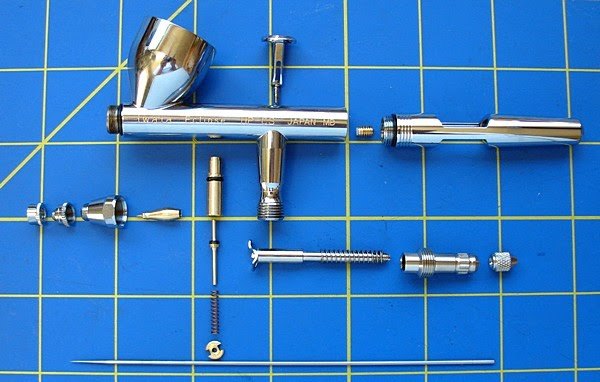
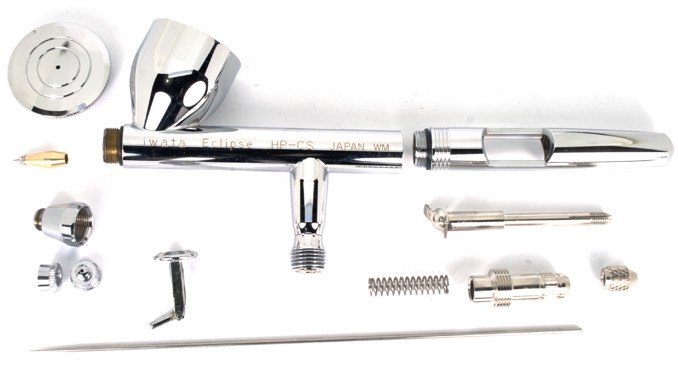
- Disassembled Photo
- Disassembled Photo 2
- Anatomy of an Airbrush
- side cut away of an airbrush (unsure of brand).
- 3d model of airbrush video
- Thiniverse model of Paintcup lid Iwata HP-CS
- Thingiverse Model of cap (no threads or anything)
- Thingiverse Model of cutaway handle mod for Iwata Revolution - Has some threads and OpenScad file.
- Thingiverse Model of Iwata Revolution Paintcut (doen't seem to have threads or anything).

Oil Painting[edit | edit source]
- Color Mixing - From a lesser known YouTuber